Monitoring your Merge Queue
Monitor key metrics of your merge queue to optimize throughput and reduce latency, ensuring a streamlined development cycle.
Monitoring your merge queue’s key metrics helps you identify bottlenecks, optimize throughput, and maintain an efficient development cycle.
Key Metrics to Monitor
Section titled Key Metrics to MonitorPRs Merged Per Day
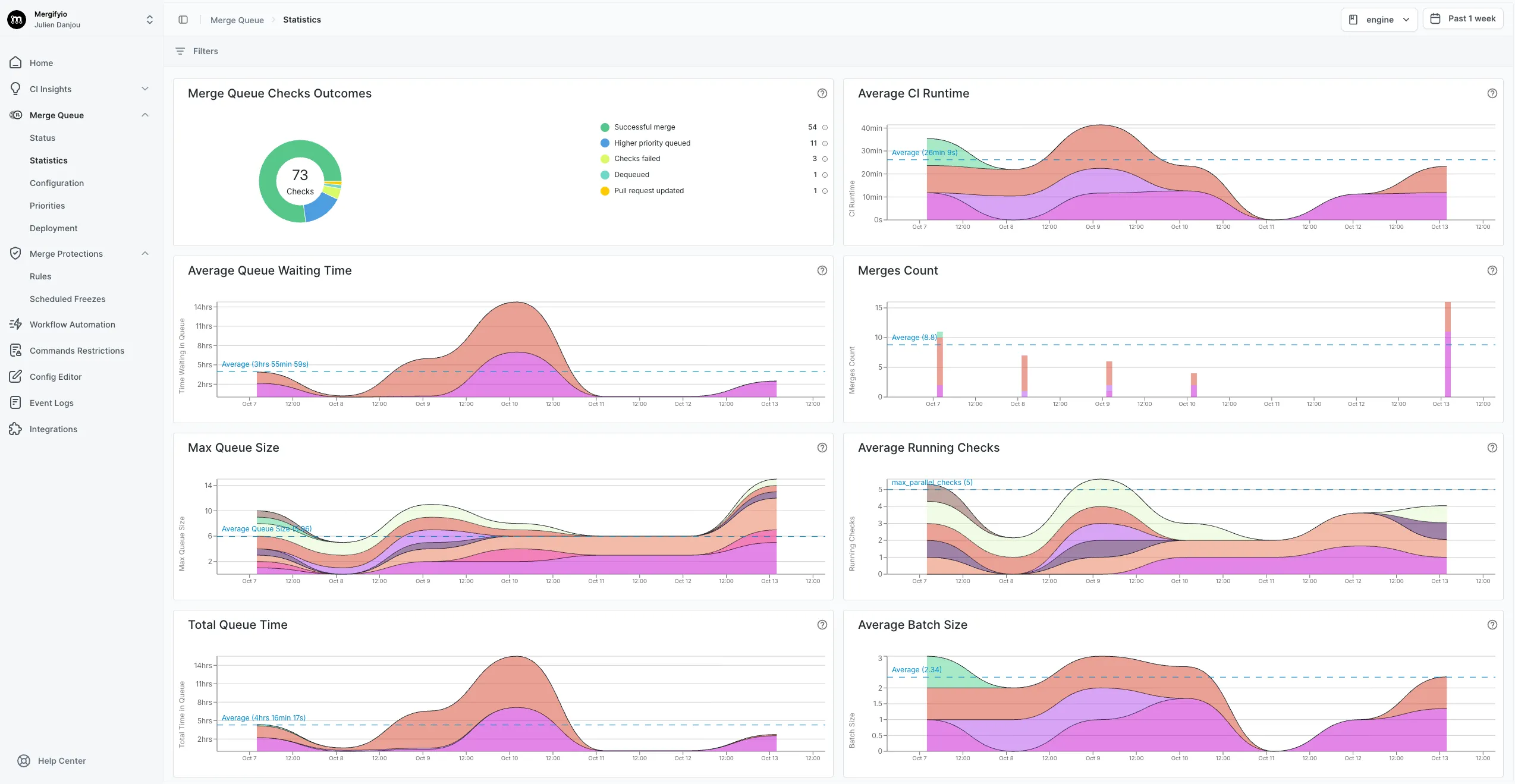
Section titled PRs Merged Per DayTrack the number of pull requests merged each day. A consistent trend indicates a stable development environment. Sudden drops or spikes can indicate issues that need attention.
CI Runtime
Section titled CI RuntimeMonitor how long your Continuous Integration tests take to run. A sudden increase in runtime can slow down your entire merge queue and delay other PRs.
Queue Checks Outcome
Section titled Queue Checks OutcomeTrack the success rate of PRs in the queue. High success rates indicate a healthy development and review process. Frequent failures may signal a need for process refinement or CI improvements.
Queue Size
Section titled Queue SizeMonitor the number of PRs waiting in the queue. If the queue grows significantly or continuously, it indicates a bottleneck or inefficiency in your process or CI.
Running Checks
Section titled Running ChecksMonitor the number of checks currently running. If you’re often at full capacity, consider increasing the number of parallel checks to improve throughput.
Queue Waiting Time
Section titled Queue Waiting TimeTrack how long PRs spend idle in the queue. Extended waiting times increase overall latency and can delay the delivery of features or fixes.
Viewing Your Metrics
Section titled Viewing Your MetricsView these metrics on the merge queue page of your dashboard:
Monitoring the Queue with the CLI
Section titled Monitoring the Queue with the CLIYou can check your merge queue status from the command line using the Mergify CLI.
mergify queue statusThis displays:
-
Pause status — whether the queue is paused, with reason and elapsed time
-
Batches — batches organized by scope with status indicators and their pull requests
-
Waiting PRs — queued pull requests with priority, queue time, and estimated merge time
To filter results to a specific branch:
mergify queue status --branch mainUse --json for machine-readable output:
mergify queue status --jsonInspecting a Pull Request
Section titled Inspecting a Pull RequestTo see the detailed state of a specific pull request in the queue:
mergify queue show <pr_number>This displays the PR’s position, priority, queue rule, CI checks summary, and
blocking conditions. Use --verbose (-v) for the full checks table and
conditions tree:
mergify queue show 123 --verboseIntegrations
Section titled IntegrationsYou can also build your own monitoring solution using the Mergify API.
Was this page helpful?
Thanks for your feedback!